Technology Solutions Professional: What They Do, Skills, Costs & How to Hire One
A slow network, a phishing email, or a failed backup can stop a small business in a single day. Most owners have no time or training to fix these problems. Many also do not know whom to call. A technology solutions professional is the person who closes that gap.
A technology solutions professional is an expert who studies a business problem, matches it with the right technology, and helps plan, set up, and improve it. This guide from USA Business Daily explains what the role involves, which skills matter, and when to bring one in. It also covers cost factors, a step-by-step hiring process, and the career path for readers who want to enter the field.
It is written for U.S. owners, founders, office managers, and job seekers. If you are still setting up your company, start with our guide on how to start a business in the USA. For a wider view of the services involved, see our companion article on technology solutions for small businesses.
What Is a Technology Solutions Professional?
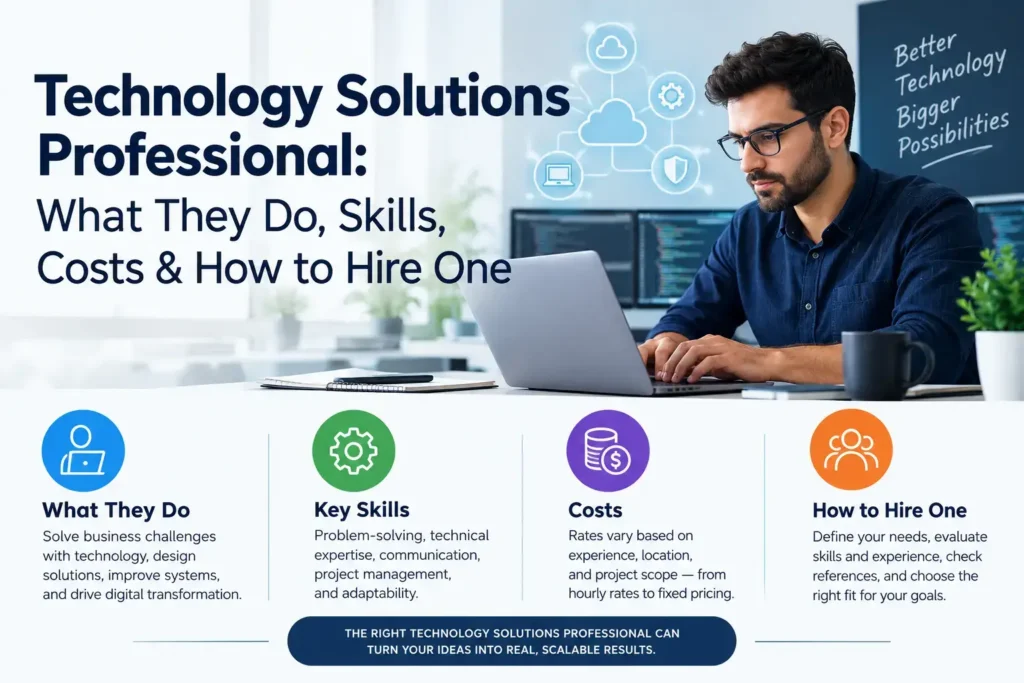
A technology solutions professional is a specialist who helps organizations choose, implement, secure, and manage technology to meet business goals. The work covers areas such as cloud systems, cybersecurity, data backup, business software, and automation. The role focuses on solving business problems, not only repairing equipment.
The phrase is used in two ways, and it helps to know which one you need.
Job Title vs. Service Provider
As a job title: Some employers use “technology solutions professional” for staff who advise customers or internal teams on technology. At some large software vendors, the title describes a pre-sales or advisory role. Titles differ from one employer to the next, so always read the job description.
As a type of provider: Small businesses often use the phrase for an independent consultant or a firm that delivers technology services. This is the meaning most owners have in mind when they search for help.
This article covers both. The first half explains the role and the second half shows you how to hire one.
How This Role Differs From Similar Roles
People often mix up several IT roles. This table shows where a technology solutions professional fits.
| Role | Main focus | Typical work |
| Technology solutions professional | Matching technology to business goals | Assessments, planning, implementation, improvement |
| IT support technician | Fixing everyday problems | Password resets, printers, device repairs |
| IT consultant | Advice and strategy | Reviews, recommendations, roadmaps |
| Managed service provider (MSP) | Ongoing IT management | Monitoring, support, security under a monthly contract |
| System administrator | Running internal systems | Servers, accounts, updates, access control |
The roles overlap. A good technology solutions professional often combines advice, hands-on setup, and follow-up support.
What Does a Technology Solutions Professional Do?
The daily work depends on the employer and the client. Most professionals handle seven core tasks.
1. Assess Business Needs
They start by asking questions. What slows your team down? Which systems break most often? Which data would hurt most if lost? The answers shape every later decision.
2. Review Existing Systems
They list your devices, software, networks, and accounts. This review often reveals unused subscriptions, outdated devices, and weak passwords that owners did not know about.
3. Recommend Suitable Solutions
A strong professional matches tools to real problems. A five-person startup rarely needs the same setup as a company with three offices. Good advice includes what not to buy.
4. Plan and Implement Systems
Once you approve a plan, they set up the technology. This can include moving files to the cloud, configuring email, installing security tools, or connecting two software systems.
5. Strengthen Security
They enable protections such as multifactor authentication (MFA), device encryption, and regular updates. Many follow the NIST Cybersecurity Framework, which organizes security work into six functions: govern, identify, protect, detect, respond, and recover. NIST also publishes a small-business guide to the framework.
6. Train Staff
New tools only help if people use them correctly. A professional may run short training sessions on phishing awareness, file sharing, or new software.
7. Monitor, Support, and Improve
After launch, they check performance, fix issues, and review costs. Technology changes, so the plan should change with it.
Skills of a Strong Technology Solutions Professional

Technical knowledge matters, but it is not enough. The best professionals combine three skill groups.
Technical Skills
- Cloud platforms: familiarity with services such as Amazon Web Services, Microsoft Azure, and Google Cloud.
- Networking: setting up and protecting business networks and Wi-Fi.
- Cybersecurity basics: access control, encryption, backups, and incident response.
- Software integration: connecting accounting, customer, and payroll systems.
- Automation and AI: using workflow tools and AI assistants safely.
Business Skills
- Budgeting: comparing the full cost of options, not only the sticker price.
- Risk thinking: knowing which failures would hurt the business most.
- Project management: keeping tasks, deadlines, and costs under control.
- Industry awareness: understanding rules that affect your sector, such as how you handle customer data.
Communication Skills
- Plain language: explaining a technical issue without jargon.
- Listening: asking questions before giving answers.
- Honest advice: saying when a cheaper or simpler option will do.
If a candidate cannot explain their plan in terms you understand, treat that as a warning sign.
Services a Technology Solutions Professional Can Provide
Services vary by provider, but these are the most common areas for small businesses.
Cloud Setup and Migration
Cloud services deliver software and storage over the internet. A professional can move your files and email to the cloud, set permissions, and plan for data export if you change providers later.
Cybersecurity and Data Protection
Typical work includes enabling MFA, securing devices, filtering email, and writing a simple incident plan. Our guide to cybersecurity for small businesses walks through the practical steps. CISA also explains multifactor authentication in plain terms.
Backup and Disaster Recovery
A backup is a saved copy of your data. Disaster recovery is the plan for restoring systems after a failure or attack. A common guideline is the 3-2-1 rule: three copies, on two types of storage, with one copy offsite. A good professional tests restores instead of assuming they work.
AI and Workflow Automation
AI tools can draft text, sort requests, and move data between apps. A professional can pick safe tools, set rules for confidential data, and review the results. For example, read our guide to AI tools for small businesses.
Data and Reporting
They can connect sales, website, and accounting data to simple dashboards. This helps you see which products sell and which costs are rising.
When Does a Business Need a Technology Solutions Professional?
You do not need one for every small task. But these signs suggest it is time to get help:
- Repeated downtime. Systems slow down or fail, and nobody knows why.
- Security worries. You have no MFA, no tested backups, or no plan for an incident.
- Software overload. Your team pays for many tools that do not work together.
- Growth. You are adding staff, offices, or customers faster than your systems can handle.
- Unclear spending. You cannot say what technology costs each month or whether it pays off.
- AI interest. You want to use AI tools but are unsure about data risks and costs.
- No IT person. The “one person who knows computers” is also doing three other jobs.
The U.S. Small Business Administration’s Office of Advocacy reports that the country has millions of small firms, and NIST cites a figure of 34.8 million, with 81.9% having no employees. Many of these owners manage technology alone, which is why outside expertise can pay off.
(Verify the NIST figure against the latest official publication before you publish.)
Technology Solutions Professional vs. In-House IT vs. MSP
There are three common ways to get technology help. None is best for everyone.
| Factor | Technology solutions professional | In-house IT employee | Managed service provider |
| Best for | Projects, planning, specific problems | Larger, complex operations | Ongoing support for small teams |
| Cost pattern | Project fee, hourly rate, or retainer | Salary, benefits, training | Monthly service fee |
| Flexibility | High; hire as needed | Lower; fixed headcount | Moderate; set by contract |
| Control | Shared | Full | Shared, defined by agreement |
| Coverage | By agreement | Business hours, usually | Often includes monitoring and help desk |
| Risk | Depends on one person or small firm | Staff turnover | Contract terms and provider quality |
Many businesses combine these. For example, a company might use an MSP for daily support and hire a technology solutions professional for a cloud migration project.
How Much Does It Cost to Hire a Technology Solutions Professional?
No honest article can give one price that fits every business. Rates depend on the work, the provider, and your location. Be careful with any source that quotes a single “average” without a date, scope, and method.
Factors That Affect the Cost
| Cost factor | Why it changes the price |
| Scope of work | A one-time review costs less than a full migration |
| Number of users and devices | More users and devices mean more setup and support |
| Security requirements | Compliance and monitoring add work |
| Provider experience | Specialized skills usually cost more |
| Pricing model | Hourly, fixed project, or monthly retainer |
| Urgency | Emergency or after-hours help often costs more |
| Existing systems | Older or mixed systems take longer to fix |
Ask for Written Quotes
Request a written proposal from at least three providers. Each one should list what is included, what is excluded, the timeline, and the payment terms. Compare scope first and price second.
Budget for the Full Cost
The provider’s fee is only part of the budget. Also plan for software and cloud subscriptions, hardware, setup, training, backup storage, and security tools. Total cost of ownership (TCO) is the full cost over time:
TCO = fees + software + hardware + security + training + expected downtime costs
If you plan to add AI tools, read our breakdown of business AI costs. Cloud and AI services also depend on large computing capacity. Our article on AI infrastructure and data centers explains where that capacity comes from.
How to Hire the Right Technology Solutions Professional
Follow these six steps to compare candidates fairly.
1. Define Your Problem First
Write down what is not working. Examples include “we lose files,” “new hires wait days for accounts,” or “we have no backup plan.” A clear problem makes quotes easier to compare.
2. List Your Systems and Risks
Note your devices, software, users, and the data you must protect. Mark the failures that would hurt most, such as a payment outage or a lost customer database.
3. Check Experience and References
Ask about work with businesses of your size and industry. Request two or three references you can call. Ask what they have actually implemented, not just what they have studied.
4. Verify Credentials
Certifications can show verified knowledge, but they do not guarantee quality. Ask which ones the person holds and confirm them with the issuer. Common examples include CompTIA credentials, AWS certifications, Microsoft certifications, and the ISC2 CISSP for security.
5. Compare Scope, Security, and Support
Check what the agreement covers, how fast they respond, and how they protect your data and their own access to your systems. Ask how often they test backups.
6. Review the Contract
Read the cancellation terms. Confirm that you own your data, accounts, and passwords. Ask how they would hand over your systems if you left.
Questions to Ask Before You Sign
Use these questions in your first meeting:
- What problems have you solved for businesses like mine?
- Which tools do you recommend, and why those over alternatives?
- How do you protect my data and your access to my systems?
- What is your response time for urgent problems?
- Who owns the accounts, licenses, and documentation?
- What happens if we end the agreement?
- How will we measure whether your work succeeded?
- Which costs are not included in your quote?
A trustworthy technology solutions professional will answer clearly and will not pressure you to decide on the spot.
Common Mistakes to Avoid
- Hiring on price alone. The cheapest quote may leave out security, training, or support.
- Skipping references. A confident sales pitch is not proof of results.
- Giving up control. Make sure you hold the admin accounts and the backups.
- Buying tools before defining the problem. Software should follow the need.
- Ignoring training. Staff errors cause many incidents, so train your team.
- Never reviewing results. Set a check-in every quarter to review costs and performance.
A Quick Technology Review Checklist
Use this list before you meet a provider. It shows you what to tell them.
Devices
- List all laptops, phones, and tablets.
- Mark devices that no longer receive updates.
Software
- List every paid subscription.
- Note the tools your team actually uses.
Access
- Check which accounts have MFA.
- Remove accounts for former employees.
Backups
- Note where your data is stored and how often it is copied.
- Record the last time you tested a restore.
Support and goals
- Write down who you call when something breaks.
- List technology goals for the next 12 months.
Career Path: How to Become a Technology Solutions Professional
If you want to work in this field, there is no single route. Employers often look for a mix of education, certifications, and hands-on experience.
Education and Experience
Many professionals start in IT support, networking, or system administration. A degree in computer science, information technology, or a related field helps, but practical experience and certifications can also open doors. Build a home lab, volunteer for a nonprofit, or take on small projects to show real results.
Certifications
Certifications can support your resume. Choose them to match the work you want. Cloud certifications suit infrastructure roles, and security certifications suit protection roles. Always check the current requirements with the issuing organization.
Job Outlook
The U.S. Bureau of Labor Statistics projects 29% growth for information security analysts from 2024 to 2034. That figure covers one occupation, not every technology solutions role, so treat it as a sign of strong demand for security skills rather than a forecast for the whole field. Check the latest BLS release before you cite it.
Workers who also want to compare fields can read our guide to digital marketing jobs in the USA.
Frequently Asked Questions
What does a technology solutions professional do?
A technology solutions professional assesses business needs, recommends technology, and helps plan, set up, secure, and improve systems. The work can include cloud setup, cybersecurity, backups, automation, and staff training.
Is a technology solutions professional the same as an IT consultant?
Not exactly. An IT consultant mainly gives advice and strategy. A technology solutions professional often advises and also helps put the plan into action. Some people do both.
What skills does a technology solutions professional need?
They need technical skills such as cloud, networking, and security basics. They also need business skills like budgeting and risk thinking, and clear communication with nontechnical people.
How much does it cost to hire a technology solutions professional?
Cost depends on scope, users, devices, security needs, and pricing model. Ask for written quotes that list what is included, then compare the total cost of ownership.
When should a small business hire one?
Consider hiring when you face repeated downtime, security gaps, too many disconnected tools, fast growth, or no clear technology plan.
Is outsourcing better than hiring in-house?
It depends on your size and needs. Outsourcing often suits small teams without IT staff. An in-house hire may suit larger or more specialized operations.
What certifications should a technology solutions professional have?
There is no single required certification. Common options include CompTIA, AWS, Microsoft, and ISC2 credentials. Confirm any claim with the issuer.
How do I become a technology solutions professional?
Start with a foundation in IT support or networking. Add hands-on projects, relevant certifications, and communication skills. Then move toward advisory and implementation work.
Conclusion
A technology solutions professional helps a business choose and manage technology that fits its goals, risks, and budget. The right person can reduce downtime, improve security, and make spending clearer. The wrong choice can add cost without solving the problem.
Start by writing down your biggest technology problem. Use the checklist and interview questions in this guide to compare providers, and ask for written quotes. Then review the results each quarter. For more practical advice, explore our guides on technology solutions for small businesses, cybersecurity for small businesses, and AI tools for small businesses from USABusinessDaily.